How do I make a sorting algorithm video, step by step?
- Open Sort Spectrum. Open Sort Spectrum from the Create page or the math simulation video maker page. Customizing and previewing are free and need no account. Open Sort Spectrum in the studio
- Choose the algorithms. Pick the sorts to show, up to eight from 47, among them Quick, Merge, Heap, Radix, Tim, Bitonic, Gravity, Stooge, Bogo and Sleep Sort. Set Mode to Battle to race them side by side and show the finishing order.
- Choose the shape. Shape has 19 options. Bars is the classic look; shapes such as Galaxy or Hilbert arrange the same values into a different picture, so the rainbow comes back together in a new way.
- Set the elements and the start order. Set the element count and the start order. More elements make a denser, smoother picture and give the algorithm more work; the start order decides how scrambled the rainbow is before the first operation.
- Pick the colours and the sound. Choose the colours, then one of four sound voices. Every operation plays a note pitched by the value it moves, which gives the classic sorting sound, and a final sweep confirms the result.
- Preview and record. Press preview and watch the whole sort with the sound on. When the timing works, record the clip. Signing up is free and lets you save and download the MP4.
Which sorting algorithms make the best video?
Pick algorithms whose movement looks different, so viewers can tell them apart at a glance. Some ideas:
- Classroom favourites: Quick, Merge and Heap Sort, three well-known approaches that each move the values in their own pattern.
- Digit by digit: Radix Sort orders the values by their digits instead of comparing pairs, so the picture changes in passes.
- Funny contrast: Bogo Sort or Sleep Sort next to Quick Sort, for a clip about how not to sort.
- Unusual mechanics: Gravity, Bitonic and Stooge Sort look unlike the algorithms most viewers learned first.
How do I race sorting algorithms against each other?
Set Mode to Battle in Sort Spectrum: it races the algorithms you picked side by side and shows the finishing order at the end. Put a fast algorithm against a slow one for a clear result, or two close rivals for a tense one, and ask viewers in the first second which one they think finishes first. The race follows each algorithm's real steps, so the order is not scripted.
What other algorithm videos can I make?
Algo Arena turns search-and-growth algorithms into a territory battle. Set Teams (2 to 6) and give each team its own algorithm with Team 1 algorithm, Team 2 algorithm and so on: BFS, DFS, RANDOM, EXPLORER, PRISM, RICOCHET, DRAGON, ARCS or LIGHTNING. Each round every team takes one cell touching its own, and when nobody can move the smallest team is removed, until one algorithm is left.
Choose an Arena shape such as Rings, Star or Butterfly and a Cell resolution; Speed, Allow captures and Rest after capture change how the battle plays out, and Caption layout and Winner end card show the result. For a maths race instead of an algorithm race, Formula Towers pits formulas such as n³ against n!.
How long is a sorting algorithm video?
The length follows the sort. The element count and the algorithms you pick decide how many operations there are: fewer elements and fast algorithms make a short clip, many elements or a slow sort take longer. Check the timing in preview before you record, and see each game page for its maximum length. Algo Arena runs for up to 75 seconds.
What format do I get?
- Format: a vertical 9:16 MP4 with the sorting sound.
- Algo Arena: the same Repeatable seed and settings replay the same battle, so you can post a rematch with new team names.
- Sound: Sound in Sort Spectrum and Sound effects in Algo Arena are On or Off, depending on the audio you want.
- Cost: preview is free without an account; the Free plan includes 2 recordings a day with a watermark.
Games for this guide
 Sort Spectrum CREATOR: Up to eight of 47 sorting algorithms rebuild a rainbow on shapes like a wheel or galaxy, a note per step.
 Algo Arena CREATOR: Search algorithms battle for territory on a carved arena. Each round every contestant takes one cell touching its own, a stuck team may capture a dominated enemy cell, and when nobody can move the smallest team is removed. Last algorithm standing wins.
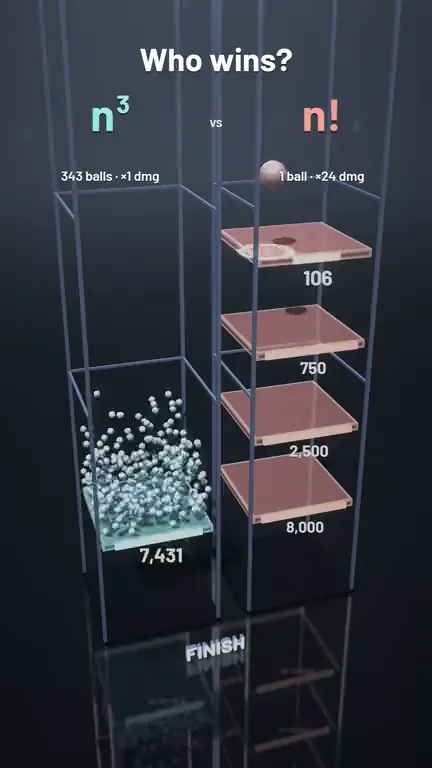 Formula Towers: Two or three formulas race as 3D towers: their balls smash through glass platforms or fill up to a goal line.
Video makers for this
Questions
Which sorting algorithms are included?
Forty-seven in Sort Spectrum, including Quick, Merge, Heap, Radix, Tim, Bitonic, Gravity, Stooge, Bogo and Sleep Sort.
Does it make the classic sorting sound?
Yes. Every operation plays a note pitched by its value, and you can choose from four sound voices.
Can I race algorithms against each other?
Yes. Battle mode in Sort Spectrum races sorting algorithms side by side and shows the finishing order, and Algo Arena makes search algorithms such as BFS and DFS fight for territory.
Is the sorting real or animated?
Real. Each algorithm runs its own steps on the values you set up, and the picture shows every operation, so changing the algorithm changes the motion.
Is it free?
Preview costs nothing and needs no account. The Free plan includes 2 recordings a day, each with a small vidirexa.com watermark; Creator, Pro and Lifetime recordings have none. Each week some games need a paid plan and show a PRO or CREATOR badge.